This week, I became heavily interested in the file deletion process and how it connects to digital forensics. In this blog, I will detail how the operating system handles deleted files at a lower level, how SSDs handle the file deletion process, including concepts like TRIM functionality, wear leveling, the role of the SSD controller and its cache, and how these factors impact secure deletion tools like SDelete and the forensic challenge of file carving. We’ll explore why, even when file content seems unrecoverable, artifacts like original filenames can sometimes still be found. This blog may seem a bit random; there is no particular reason for it, I just wanted to document my understanding. I'm always open to criticism and learning.
In order to understand how file carving works, we first have to explore the idea of file deletion in our OS and modern SSDs. I'm not going to talk much about older SSDs, although I'll reference some of their differences to modern ones. Modern SSDs use a controller to manage data efficiently through wear leveling, garbage collection, and the TRIM command. Wear leveling spreads writes evenly to prevent early failure, garbage collection clears invalid data, and TRIM tells the SSD what’s been deleted so it doesn’t waste time moving it. (This is an oversimplification, obviously.) An interesting fact we can note is that SSDs pre 2010 without TRIM wasted write/erase cycles, meaning they had shorter life spans and were probably replaced a lot more often.
Let's become familiar with some common terminology:
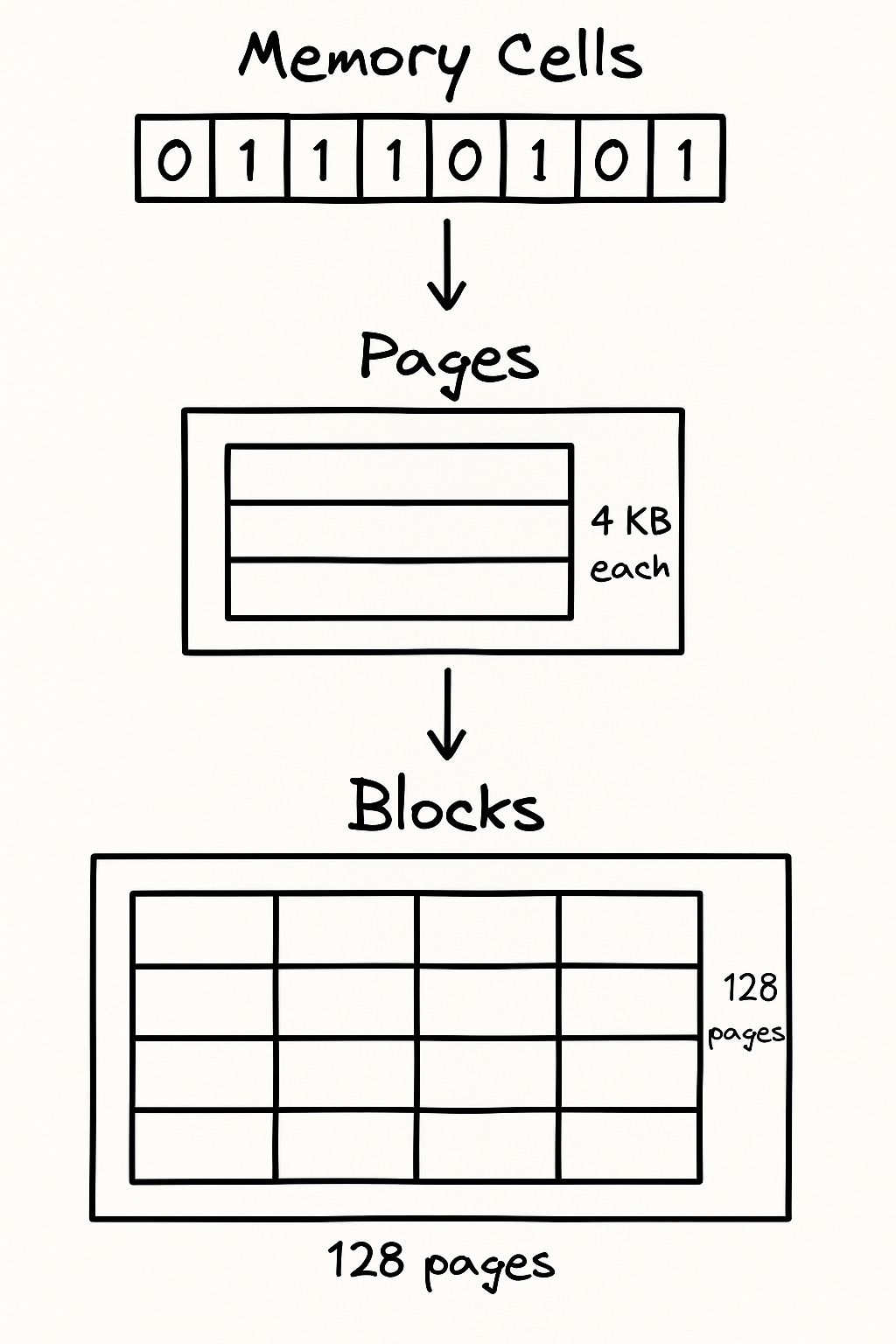
SSDs data is organized in a hierarchical structure..memory cells, pages, and blocks:
Memory Cells: At the most fundamental level, data is stored in memory cells. Each cell typically stores a single bit of information (in Single-Level Cell (SLC) technology) or multiple bits (in Multi-Level Cell (MLC) or Triple Level Cell (TLC) technology). These cells are the individual storage units.
Pages: Multiple memory cells are grouped together to form a page. A page is the smallest unit of data that can be written to an SSD, commonly 4KB.
Blocks: Multiple pages are then grouped together to form a block. A block is the smallest unit of data that can be erased in an SSD. A typical block might consist of 128 pages, meaning a 4KB page would result in a 512KB block (128 pages * 4KB/page).
Unallocated Cluster: Refers to the space on a storage disk that is available for storing new data and often contains remnants of deleted files. Recovered by locating file signatures (header, footer) and extracting data between these endpoints.
Slack Space: Unused space at the end of a file
Secure Deletion: When a file is deleted by teh OS, information of that file such as where it is located on the physical device in the file allocation table is removed. But the data is still physically written to storage medium, until the same physical medium is written over with new information.
SSD Controller: A microprocessor embedded in the SSD that manages how data is stored, accessed, and maintained across the flash memory chips. The controller is also responsible for deciding when to run garbage collection, how to map logical to physical addresses, and managing error correction.
Wear Leveling: Technique used in SSDs to spread write/erase cycles evenly across memory blocks. Why is this important? If some memory blocks are used more frequently than others, then they wear out faster. Prevents early failure of specific blocks, keeps performance stable, and extends life span. Ideally, all of the blocks of the SSD need to wear out at the same rate throughout the life of the drive. (https://youtube.com/shorts/FR2GDgPTmA8?si=egvlShXT8AluDzpu).
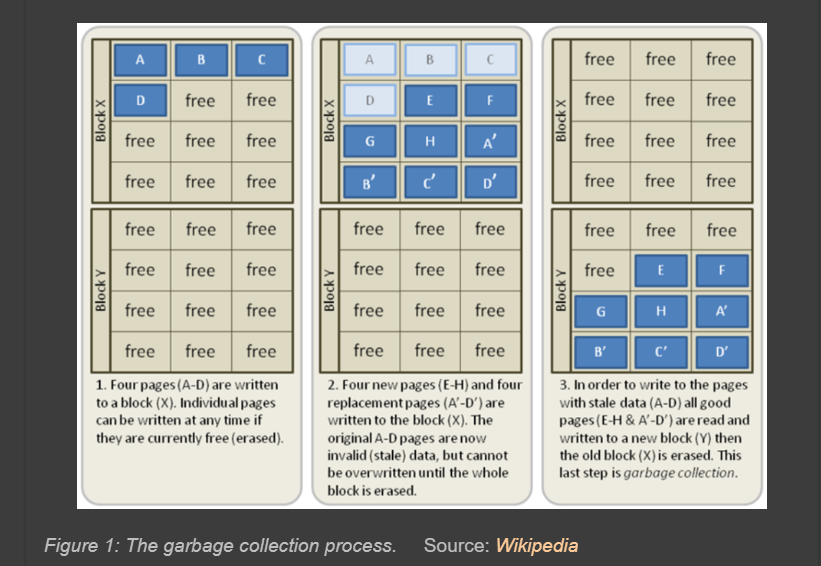
Garbage Collection: (GC): SSD process that frees up space by cleaning out
memory blocks (Old data might still linger for a while (unless overwritten or erased securely)).
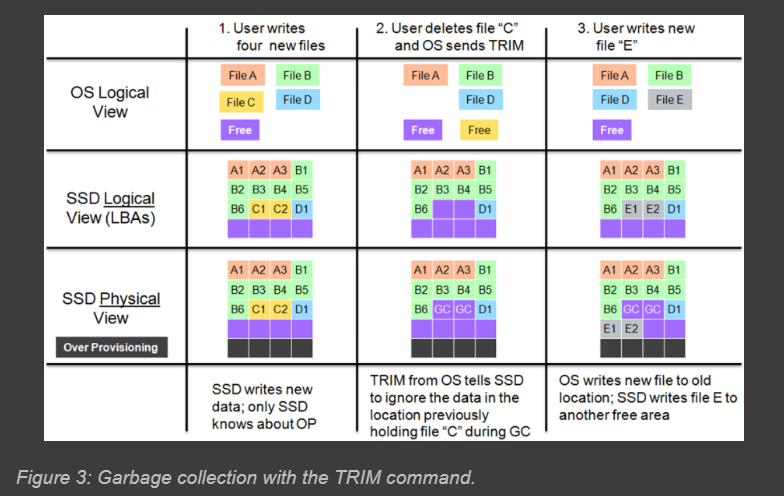
TRIM: The TRIM command enables the OS to notify the SSD that old data is no longer valid, and at the same time, it deletes the logical block addresses from its logical table. The advantage of the TRIM command is that it enables the SSD’s GC to skip the invalid data rather than moving it, thus saving time not rewriting the invalid data. (results in a reduction of the number of erase cycles on the flash memory and enables higher performance during writes). I'm going to note a comparison of modern SSDs that support TRIM vs Legacy SSDs, which handles the garbage collection process differently.
NAND flash memory(physical storage medium) is the foundational technology in SSDs that influences how data is stored, managed, and can only be erased at the block level, also has a limited amount of erase cycles. Deletion ONLY happens at the block level.
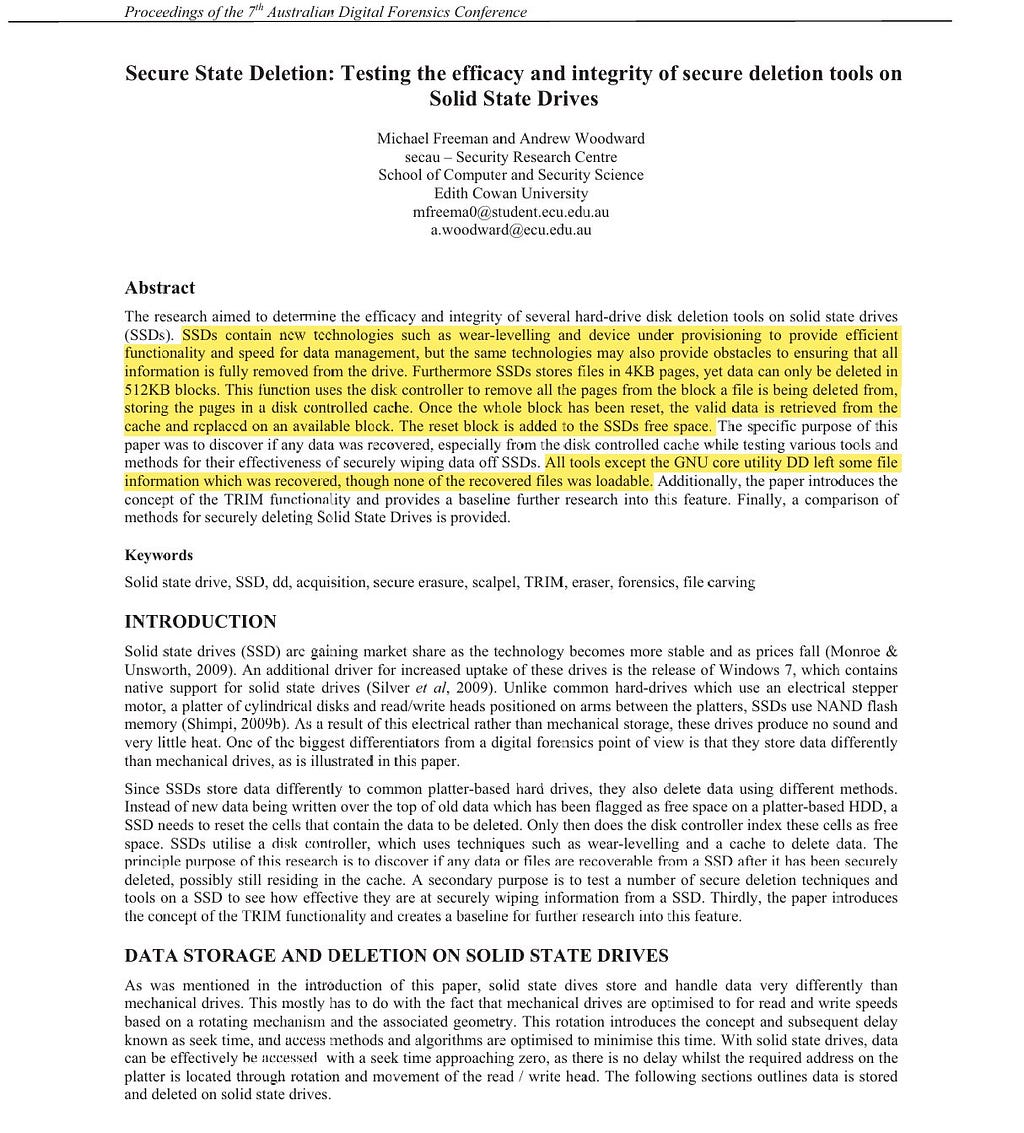
Cache: The cache is a fundamental part of how SSDs manage data deletion and create free space. When a block of data is to be deleted, valid pages from that block are moved to a disk controlled cache. The block is then reset, and the valid data is moved from the cache to an available block.
File Carving: To keep it simple, it’s the process of recovering files from unallocated or raw disk space.
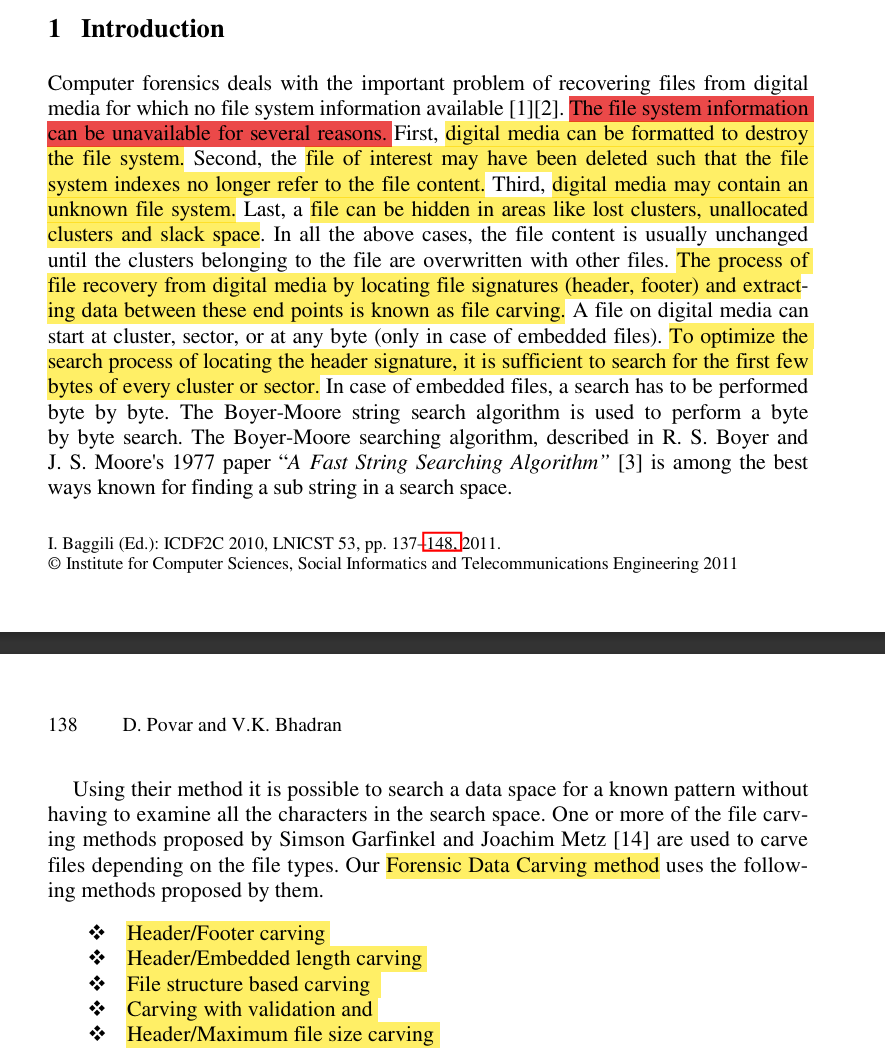
To help visualize this:
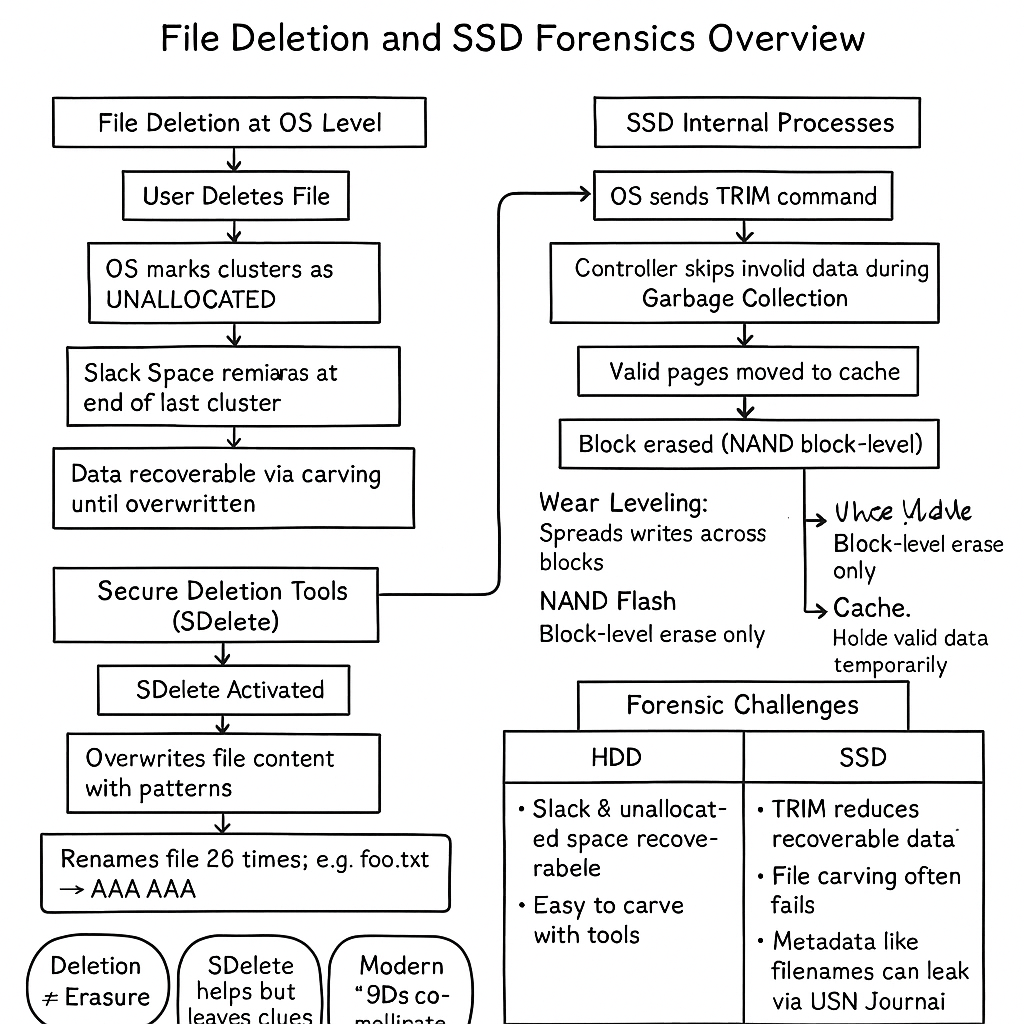
So now, let's put these concepts together (if you follow me on X, sorry for explaining this again LOL, I'm going to paste my explanation from earlier):
How File Deletion Works in OS
When you delete a file, the OS marks the clusters that the file used as unallocated, BUT the data remains physically there until it’s overwritten. This leftover space in the cluster that wasn’t fully used by the file is called slack space (later we note that data can be withheld within slack space). This slack space can hold remnants of old data until it’s overwritten…..soooooo you didn’t actually delete the data…nice. What happens if a file is bigger than a single cluster? In that case, the operating system allocates multiple clusters to store the file data. Each of these clusters will be fully or partially occupied by the file, and if the last cluster isn’t entirely filled, that’s where you’ll find slack space :).
SSDs and the TRIM Command
At the SSD level, the TRIM command comes into play by telling the SSD which blocks are no longer needed, so the SSD can handle them more efficiently during garbage collection. Before TRIM(legacy), the SSD would still move all the data, including deleted data, to a new block during garbage collection, which was less efficient and left more data recoverable for a longer time, like I mentioned. After TRIM, the SSD can skip over the blocks that contain deleted data, making garbage collection more efficient and ensuring that the deleted data is cleared out more thoroughly. Then we also have wear leveling, which is all about distributing the data evenly across the memory cells so that no single cell gets too much wear and tear. This process kicks in when new data is being written, especially if it’s taking the place of previously unallocated space. So as the SSD writes new data, it tries to spread the writes out evenly to extend the life of the drive. And guess what, the NAND flash memory is made up of all these memory blocks. A lot of information but this is relevant to forensics.
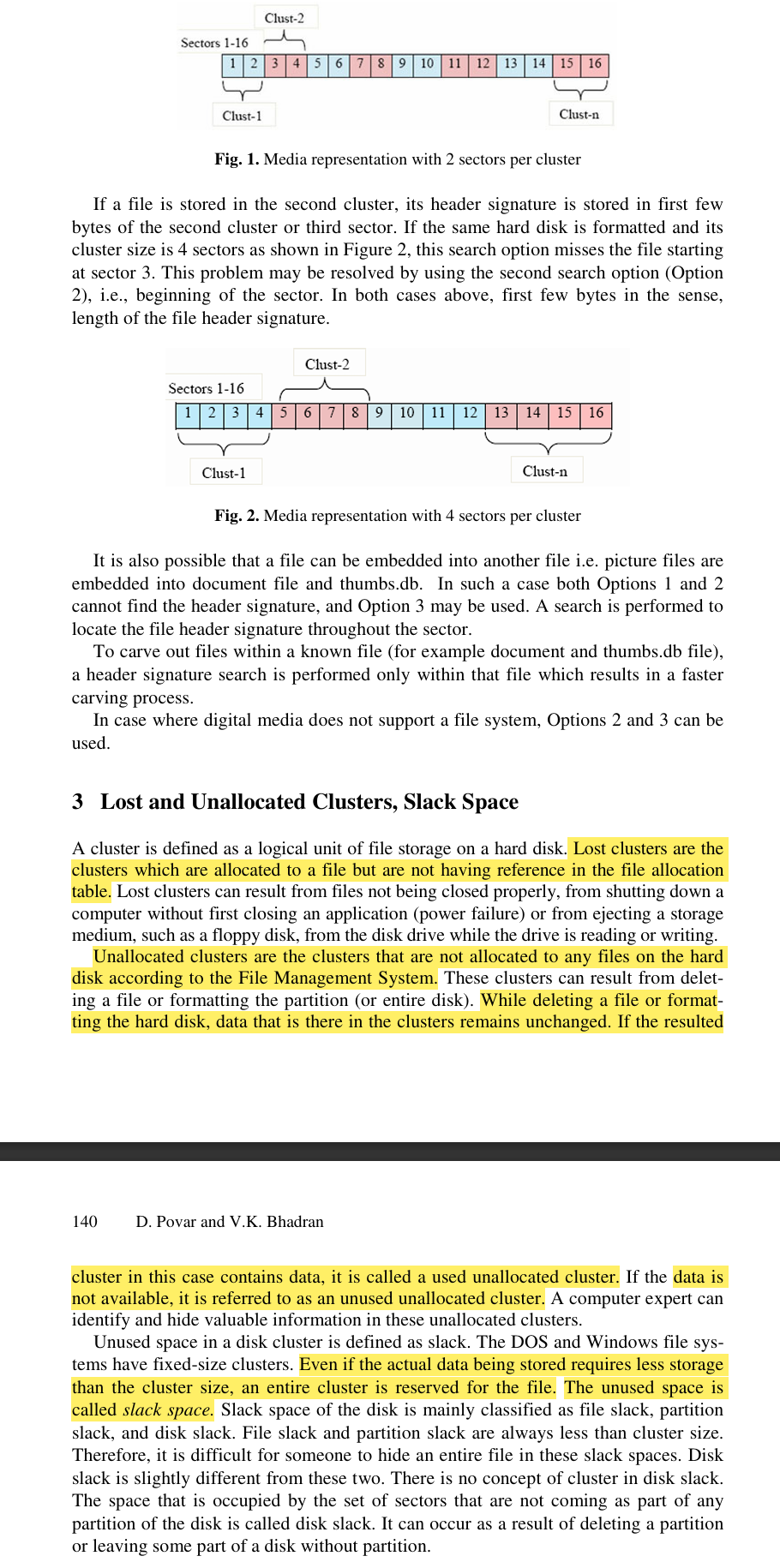
Secure Deletion Tools: Spotlight on SDelete
Okay to im going to try to put things together a bit more here, “Secure State Deletion: Testing the efficacy and integrity of secure deletion tools on Solid State Drives” established that even if carving tools like Scalpel detect remnants of files after SDelete use (on SSDs without TRIM)(I haven’t read similar tests on newer SSDs)…the actual data is “rendered unreadable and unusable”. SDelete’s overwriting process destroys the original file content. For normal files, SDelete is straightforward: it repeatedly writes over the file’s data with special patterns (like zeros or random data) before actually removing the file. “It also renames the file many times (“foo.txt” becomes “AAA[.]AAA”) to make its original name unidentifiable”.
Forensic Implications & File Carving
NOW, one interesting thing to note is that “Forensic Detection of Files Deleted via SDelete” shows us that SDelete’s renaming process, which creates those “AAAAAAA[.]AAAAA” artifacts we just talked about, leaves detectable traces in the USN Journal ($J file). “This stream contains records of filesystem operations, primarily to allow backup applications visibility into the files that have been changed since the last time a backup was run”. By analyzing these entries, specifically looking for the 26 alphabetical renames with the same timestamp, and then filtering by the EntryNumber (which links back to the original file’s creation), we can uncover the original file name. Pretty cool insight, and it helps to understand how file deletion works in the first place, making understanding Sdelete a whole lot easier ngl. So Sdelete is effective in preventing file carving, but doesn’t really hide what was there in the first place.
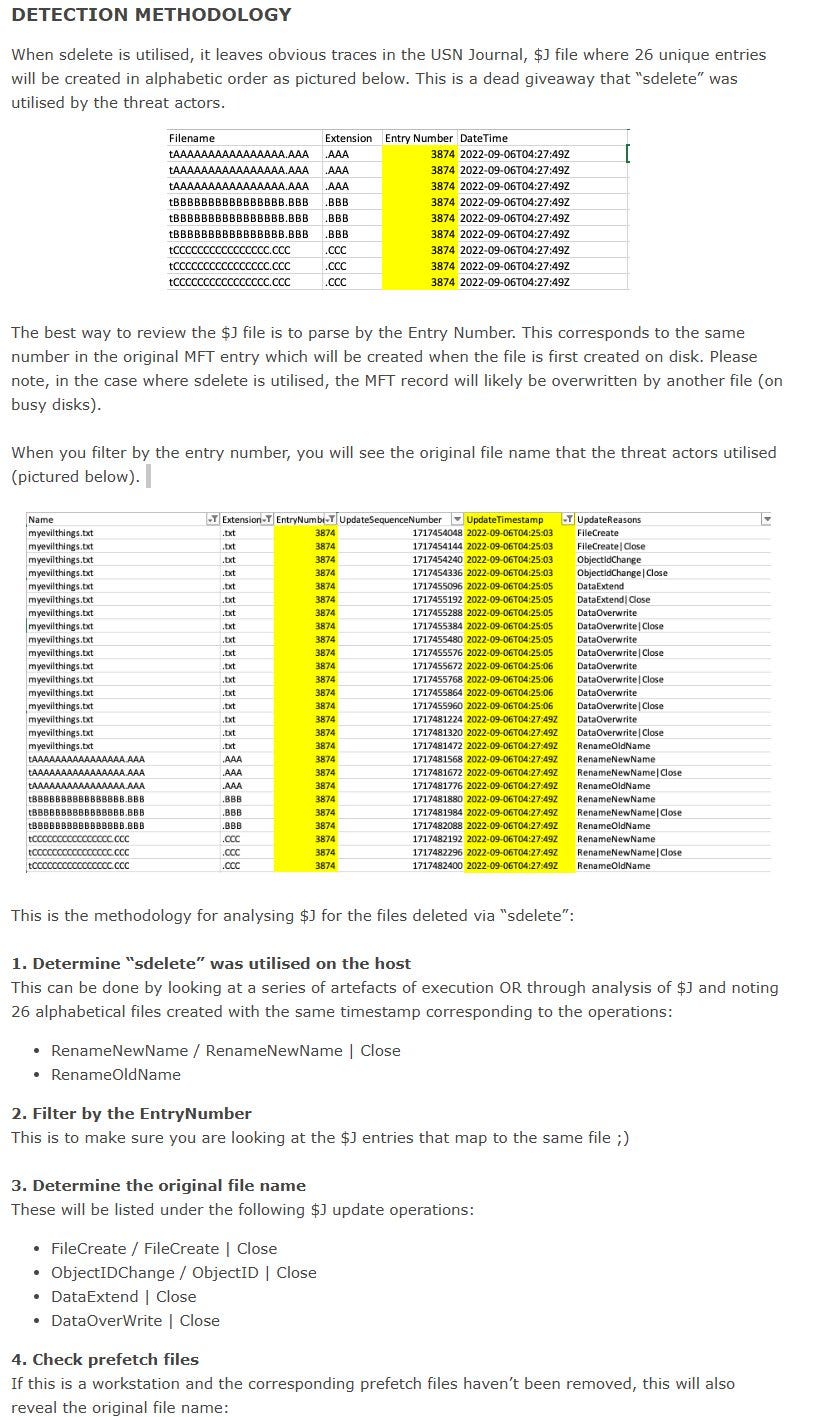
Key Takeaways:
Deleting a file doesn’t actually erase it. The operating system just marks its storage space as unallocated, leaving the data recoverable until it’s overwritten.
Slack space and unallocated clusters can contain fragments of deleted or partial files, making them valuable.
SSDs manage data differently than HDDs, using a controller, wear leveling, garbage collection, and TRIM commands to optimize performance and lifespan.
The TRIM command helps SSDs “forget” deleted data by informing the controller which blocks are no longer valid. This makes data recovery after deletion much harder.
Secure deletion tools like SDelete overwrite data, making file carving difficult or impossible. However, metadata artifacts (like filenames) can still sometimes be recovered.
SDelete renames files multiple times before deletion, and these rename operations can leave traces in the USN Journal, revealing forensic clues.
Modern SSDs are harder to investigate with traditional forensic techniques due to how they handle data deletion at the block level and obscure actual physical locations of files.
Resources Utilized:
“Forensic Data Carving” chapter from Digital Forensics and Cyber Crime.
Fikri, and Nurhayati Buslim. “The Analysis of File Carving Process Using Photorec and Foremost.” ResearchGate, unknown, 14 July 2020, www.researchgate.net/publication/342925810_The_Analysis_of_File_Carving_Process_Using_Photorec_and_Foremost. Accessed 27 June 2025.
Freeman, Michael, and Andrew Woodward. “Secure State Deletion: Testing the Efficacy and Integrity of Secure Deletion Tools on Solid State Drives.” ResearchGate, unknown, 2009, www.researchgate.net/publication/49284163_Secure_State_Deletion_Testing_the_efficacy_and_integrity_of_secure_deletion_tools_on_Solid_State_Drives. Accessed 27 June 2025.
inversecos. “Forensic Detection of Files Deleted via SDelete.” Inversecos.com, Blogger, 6 Sept. 2022, www.inversecos.com/2022/09/forensic-detection-of-files-deleted-via.html. Accessed 27 June 2025.
Reardon, J., et al. “SoK: Secure Data Deletion.” 2013 IEEE Symposium on Security and Privacy, May 2013, oaklandsok.github.io/papers/reardon2013.pdf, https://doi.org/10.1109/sp.2013.28.
Tokar, Les. “Garbage Collection and TRIM in SSDs Explained — an SSD Primer.” The SSD Review, 17 Apr. 2012, www.thessdreview.com/daily-news/latest-buzz/garbage-collection-and-trim-in-ssds-explained-an-ssd-primer/.
Warlock. “File Carving | Infosec.” Www.infosecinstitute.com, 4 Feb. 2018, www.infosecinstitute.com/resources/digital-forensics/file-carving/.