I have been digging into persistence methods on macOS and wanted to test one from registration through execution. The focus here is a Login Item: what macOS stores, what Background Task Management (BTM) exposes, and how to prove the item actually ran.
I created a background-only application named BTM Detection Demo. Its only job was to write a timestamp, process ID, and username to a log before exiting.
The application bundle
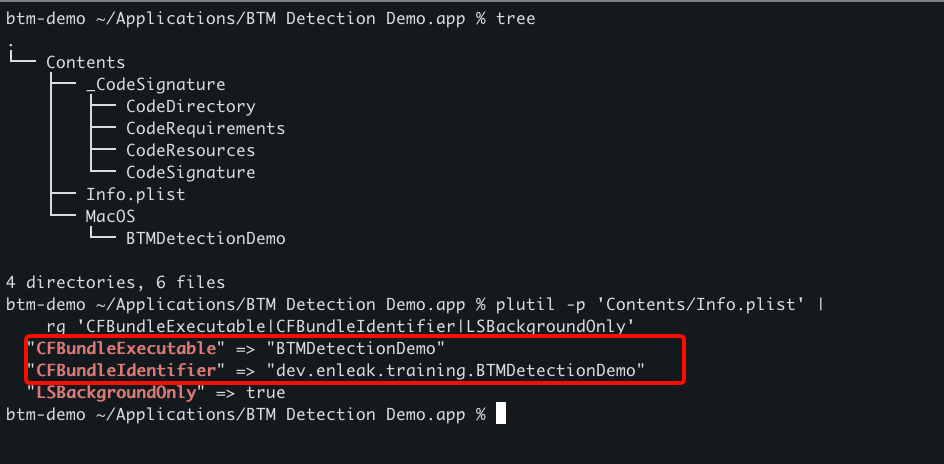
A macOS .app is a structured directory. In this bundle, Contents/Info.plist describes the application and Contents/MacOS/BTMDetectionDemo contains the executable zsh script. The CFBundleExecutable value connects the two by telling macOS which file to launch when the app opens. LSBackgroundOnly lets it run without a normal window or Dock presence.
Registering the Login Item
I used osascript and System Events to register the application as a traditional Login Item. That created a durable instruction telling macOS to open it when the user logs in. Modern applications can instead use Apple's SMAppService API to register and control bundled Login Items, LaunchAgents, and LaunchDaemons.
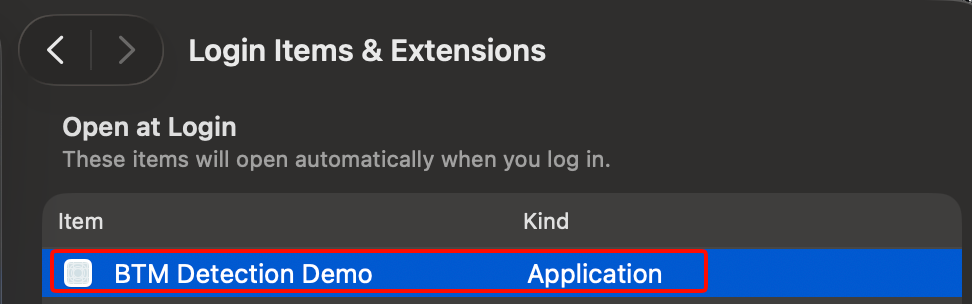
The demo appeared under System Settings → General → Login Items & Extensions → Open at Login.
BTM also created a record and reported the item as enabled, allowed, and notified. BTM provided visibility into the registration; the Login Item itself provided persistence. Registration proved the mechanism was configured, but not that the payload had executed.
The Unified Log captured the registration, BTM advisory, and updated BTM database being saved.

Proving execution
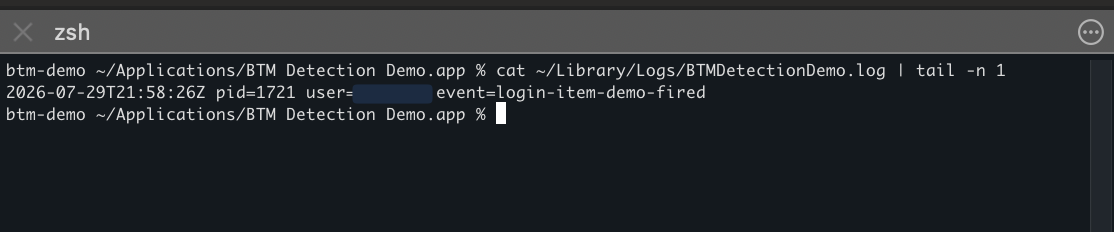
I logged out and logged back in to test the trigger. The new console session began at 5:58 PM, and the application wrote a new event at 5:58:26 PM. Its new timestamp and process ID confirmed that macOS launched a fresh instance after login.
The takeaway
Persistence is a durable way to regain execution when a trigger occurs. Here, the Login Item was the mechanism, user login was the trigger, and the timestamped event was the proof.
Sources and further reading
- How to diagnose and control login and background items — The Eclectic Light Company
- Manage login items and background tasks on Mac — Apple Platform Deployment