Three operating systems, one execution decision
A dynamic loader locates the libraries required by a program, maps them into its address space, resolves imported symbols, and prepares the program to execute. Windows performs this with PE files and DLLs, macOS with Mach-O files and dylibs through dyld, and Linux with ELF files and shared objects through its ELF interpreter.
Library hijacking occurs when an attacker influences which library the loader selects. Although the implementation differs, the defensive chokepoint is the same: a process loading code from an unexpected location or trust context.
Parallel operating-system views. One shared decision boundary.
Windows loader
Windows
From Normal DLL Loading to DLL Hijacking
A Windows application rarely contains every function it needs. Instead, it can use dynamic-link libraries, or DLLs, that provide reusable code and data. An application might rely on DLLs for graphics, cryptography, networking, or retrieving file-version information. This allows multiple programs to use common functionality without implementing all of it independently.
Applications commonly use DLLs through load-time or run-time linking.
Load-time linking
With load-time linking, information about required DLLs and imported functions is placed in the executable's Portable Executable, or PE, structure when the program is built. The PE Import Directory identifies these dependencies. When Windows starts the program, the loader resolves the required DLLs and imported functions. It then places the resolved functions' memory addresses into the Import Address Table, or IAT. The program uses those addresses when it calls the imported functions.
In simple terms, the Import Directory is a list of contacts the program expects to need, while the IAT becomes the completed address book that tells the program where those contacts can be reached in memory. This analogy is simplified, but it gives us enough context to understand the loading process. Microsoft describes these structures in its PE format specification.
Run-time linking
Run-time linking happens after the program has already started. When the program needs a DLL, it can call LoadLibrary or LoadLibraryEx. Windows attempts to locate the requested module and map it into the program's virtual address space. If the operation succeeds, the function returns a handle representing the loaded module.
An exported function is a function that a DLL intentionally makes available for other code to call. The program can pass the DLL handle and the exported function's name to GetProcAddress, which returns the function's memory address. The program then uses that address to call the function. If the requested module is already loaded under the applicable conditions, Windows may return a handle to the existing module rather than mapping another copy. Microsoft explains this process in Run-Time Dynamic Linking.
Once a DLL is mapped into a process, its code does not run as a separate program. If a newly loaded DLL defines an entry point, Windows calls it with a DLL_PROCESS_ATTACH notification. This entry-point function is commonly named DllMain and gives the DLL an opportunity to perform limited initialization. DLL code can also execute later when the application calls one of its exported functions.
In either case, the code executes inside the loading process and under that process's existing security context. Mapping a DLL does not automatically give the process additional privileges. Microsoft documents this behavior in its LoadLibrary and DllMain documentation.
How Windows identifies the requested DLL
Now that we understand how a DLL becomes part of a process, the next question is how Windows decides which DLL file to load.
An application can identify a DLL in three basic ways:
- Full path
C:\Program Files\Example\version.dll - Relative path
plugins\version.dll - Bare filename
version.dll
A full path normally directs Windows to a particular location. A relative path still requires interpretation using directory context. A bare filename identifies the requested module but does not specify where its file is located.
When an application does not provide a fully qualified path, Windows may need to resolve the DLL's location. This does not mean that every application follows one universal folder list. Depending on the loading context, Windows may consider DLL redirection, API sets, side-by-side manifests, modules already loaded into the process, KnownDLLs, package dependencies, loader configuration, and eligible search directories.
The result can also depend on whether the application is packaged or unpackaged and whether it uses functions or flags that modify the default search behavior. For an analyst, the important question is not simply, “What is the DLL search order?” It is, “Which resolution rules applied to this particular load, and which file did Windows ultimately select?” Microsoft documents these factors in Dynamic-link library search order.
Where side-by-side loading fits
Side-by-side loading is one legitimate factor that can influence DLL resolution. Windows uses side-by-side assemblies to support applications that require different versions of shared components. An application manifest identifies the assemblies and versions to which the application should bind at run time. This helps prevent one application's installation from replacing a component required by another application.
For an analyst, this means that a simple directory search may not explain every DLL selection. If the observed DLL path appears unusual, the application's manifest may help explain why Windows selected that component. Side-by-side loading is legitimate Windows behavior and should not be confused with the attacker technique known as DLL side-loading. Microsoft explains the legitimate mechanism in its documentation on application manifests and side-by-side assembly sharing.
How normal DLL loading becomes an attack opportunity
These normal loading decisions can create opportunities for abuse. Suppose an application requests a DLL without fully identifying its intended location. If an attacker can write to an eligible location, they may place a malicious DLL there using the filename the application expects.
When the application runs, Windows applies the resolution rules relevant to that load. If Windows selects the attacker-controlled file, it maps the DLL into the application's address space. Code from the DLL can then execute inside the application's process context. Microsoft describes this risk in Dynamic-Link Library Security.
However, placing a DLL somewhere on disk is not enough by itself. Several conditions must come together before DLL hijacking can succeed.
What must be true for DLL hijacking to work?
First, the application must request or resolve a DLL in a way that gives an attacker-influenced file a chance to be selected. The attacker must be able to place or replace a DLL in an eligible location and cause the susceptible application to run.
The supplied DLL must also be compatible with the loading process. For example, a 32-bit process cannot load a 64-bit DLL, and a 64-bit process cannot load a 32-bit DLL. Depending on how the application uses the library, the attacker-controlled DLL may need to provide expected exports or preserve enough legitimate functionality for the application to continue running.
If the DLL is selected successfully, its code executes within the host process's existing security context. This does not automatically create persistence or elevate privileges. Persistence requires a repeatable execution trigger. Privilege escalation depends on whether the host process runs with privileges the attacker does not already possess and whether the attacker can satisfy the other conditions required for the DLL to load. (Microsoft: DLL Security; Microsoft: Process Interoperability; MITRE ATT&CK T1574.001)
The stronger defensive signal is the relationship between file placement, process execution, DLL selection, module loading, and subsequent behavior.
DLL search-order hijacking
DLL search-order hijacking occurs when an attacker influences which matching DLL Windows finds during resolution. If an application requests a DLL without a fully qualified path, Windows applies the rules and eligible directory order relevant to that load.
An attacker who can write to an earlier eligible location may place a DLL there using the requested filename. If Windows encounters that file before the intended library, it may select and load the attacker-controlled copy.
MITRE ATT&CK describes this behavior as planting a trojan DLL in a location prioritized over the legitimate library. Microsoft independently documents how control of a searched directory can allow an attacker to supply a matching DLL. (MITRE ATT&CK T1574.001; Microsoft: DLL Security)
Search-order behavior can also play a role in the next technique, but DLL side-loading describes a more recognizable attacker setup.
DLL side-loading
DLL side-loading uses a legitimate application to load an attacker-controlled DLL. The attacker commonly places a legitimate executable and malicious DLL together and then runs the executable. When the executable requests its expected DLL, normal loader behavior may cause Windows to select the nearby attacker-controlled copy.
The executable may be correctly signed, but that signature applies to the executable. It does not automatically authenticate the separate DLL or make the combined behavior trustworthy.
Analysts should determine whether the executable is running from its expected installation directory, whether the executable and DLL arrived together, and whether the process normally loads that DLL from that location. MITRE describes side-loading as positioning a legitimate application and malicious payload together so that the application loads the payload. (MITRE ATT&CK T1574.001)
Search-order hijacking and side-loading can overlap. Search-order hijacking describes the loader behavior that causes an unintended DLL to be selected. Side-loading describes the attacker's setup: pairing a legitimate executable with an attacker-controlled DLL.
Phantom DLL hijacking
Phantom DLL hijacking targets an application's reference to a DLL that is not normally present. The application may attempt to find an optional, removed, or otherwise missing DLL in several eligible locations. If an attacker identifies that behavior and can write to a suitable location, they may provide a DLL using the missing module's expected name. The application may then load the attacker-supplied file during a later execution.
Procmon might reveal the original searches as NAME NOT FOUND events. These events are common and show only that a file lookup failed. They do not independently prove that the application is exploitable or that an attack occurred.
Stronger evidence would connect the failed searches to the later creation and successful loading of the matching DLL. MITRE's detection strategy follows the same principle by correlating file creation, process creation, and module-load telemetry rather than treating one failed lookup as proof. (MITRE ATT&CK T1574.001; MITRE Detection Strategy DET0201)
Works cited
- Application Manifests
- DllMain Entry Point
- Dynamic-Link Library Search Order
- Dynamic-Link Library Security
- LoadLibraryA Function
- PE Format
- Process Interoperability
- Run-Time Dynamic Linking
- Side-by-Side Assembly Sharing
- MITRE ATT&CK T1574.001
- MITRE Detection Strategy DET0201
Microsoft Learn and MITRE ATT&CK. Accessed 27 July 2026.
dyld
macOS
Okay, so what is a Mach-O?
A Mach-O is macOS's native object-file format. Executables, dynamic libraries, bundles, and object files can all be Mach-O images. At a high level, each image gives the system three things:
That is enough structure for us to begin asking useful questions without memorizing every field in the format.
Why does it need a header?
The header lets the kernel, dyld, and analysis tools identify the image before interpreting the rest of it. It records details such as the magic value, CPU architecture, file type, flags, and the number and combined size of its load commands.
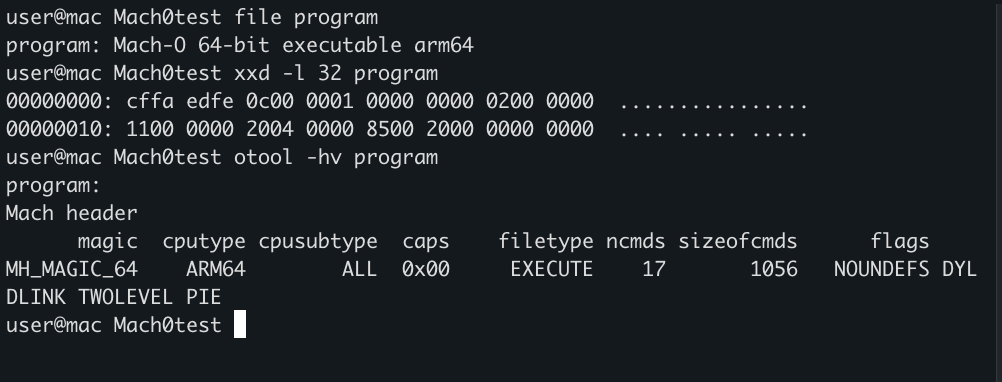
file, xxd, and otool -hv give us three views of the same binary. Open the image for the full-size output.The header also reports ncmds 17 and sizeofcmds 1056. In plain English: seventeen load-command records follow the header and together occupy 1,056 bytes.
Why are there load commands?
Load commands describe how the image should be mapped, linked, started, and validated. Despite the name, they are not a script that executes from top to bottom. Think of them as records that different parts of the loading process consult for different reasons.
LC_LOAD_DYLINKERWhich dynamic linker starts this image?LC_MAINWhere is the program's entry point?LC_LOAD_DYLIBWhich dynamic library is required?LC_CODE_SIGNATUREWhere is the embedded signature data?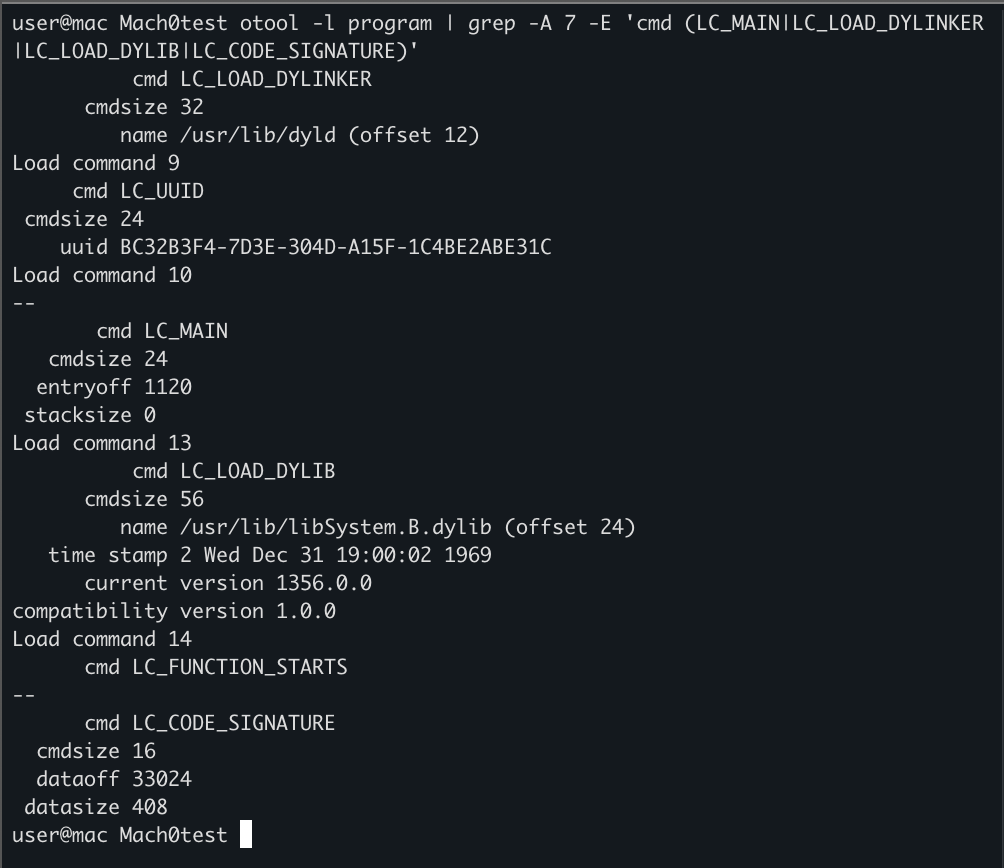
otool -l. The neighboring LC_UUID and LC_FUNCTION_STARTS records appear because the command includes surrounding output.This one screenshot already sketches the launch boundary: the image names /usr/lib/dyld as its dynamic linker, provides an entry offset through LC_MAIN, declares libSystem.B.dylib as a dependency, and points to its code-signature data.
Why does LC_LOAD_DYLIB exist?
Our program does not contain every function it might use. During linking, the executable records the install names of its dynamic-library dependencies. At launch, dyld reads those records, finds the corresponding images, maps them into the process, and resolves imported symbols.
Here our tiny program has one direct dylib dependency:

otool -L program shows the libraries recorded as direct dependencies of the image.That dependency uses an absolute install name, so there is no ambiguity about its requested location. The more interesting case—and the one that leads us toward hijacking—is a dependency recorded as something like @rpath/libExample.dylib.
So how does a Mach-O process actually start?
When a user launches a dynamically linked Mach-O executable, the kernel creates the process, maps the executable's initial code and data, loads the dynamic linker identified by LC_LOAD_DYLINKER, and gives dyld control. Our screenshot shows that linker as /usr/lib/dyld.
Recognizes the Mach-O and establishes the process.
↓02dyldReads dependency and run-path load commands.
↓03ResolutionTurns install names into actual library files.
↓04LinkingMaps images and fixes references between them.
↓05ExecutionRuns initializers and reaches the program entry point.
The internals of modern dyld are highly optimized, but this abstraction is what matters for our investigation: the executable names dependencies, dyld decides which files satisfy those names, and the selected code becomes part of the process.
Apple calls the recorded dependency name an install name. If a required library cannot be located or is incompatible, a strongly linked program normally fails to launch. Apple's dynamic-library overview describes this handoff from the kernel to dyld and the use of install names to locate dependent libraries.
Why does dyld need to resolve paths?
An install name can be an absolute path, but hardcoding one location makes an application brittle. Move the application bundle or reorganize its private frameworks and the dependency breaks. macOS therefore supports path tokens that allow a dependency to be described relative to the executable, the image requesting it, or a list of run paths.
/absolute/path/libExample.dylibAlready identifies a concrete location. No token expansion is required.
@executable_pathExpands relative to the directory containing the process's main executable.
@loader_pathExpands relative to the Mach-O image whose load command requested the dependency.
@rpathIs tried against the applicable run-path entries until dyld finds a matching image.
The difference between @executable_path and @loader_path becomes important when one dylib depends on another. The main executable stays the same, but the image doing the loading may now be a library inside a framework or plug-in directory.
Why is there a search order?
@rpath is not a directory. It is a placeholder that tells dyld to consult its run-path list. Mach-O images contribute candidate directories through LC_RPATH commands, and those candidates are considered in order. Apple designed this so applications and their private frameworks can remain relocatable instead of depending on one machine-specific location.
@rpath/libParser.dylib+First LC_RPATH@executable_path/../FrameworksSecond LC_RPATH@loader_path/../Libraries↓dyld evaluates…/Frameworks/libParser.dylib…/Libraries/libParser.dylibApple's run-path documentation describes @rpath as a run-time placeholder and states that the configured run-path locations are traversed in their specified order. Apple Developer Technical Support provides the same practical model: LC_LOAD_DYLIB contains the imported install name, while LC_RPATH contributes directories used to resolve an @rpath-relative name.
Where does dylib hijacking enter the picture?
The flexibility is legitimate. The security problem appears when an attacker can influence one of the locations that dyld is allowed to consider.
@rpath/libParser.dylib→Search candidatesattacker-writable pathintended framework path→Loader decisionfirst acceptable match wins→Resultselected dylib enters the host processSuppose the first applicable run-path directory is writable by an ordinary user while the intended dylib lives in a later directory. If a compatible dylib with the expected filename appears in the earlier location, dyld may select it before reaching the intended copy. That is the heart of @rpath-based dylib hijacking.
A related case involves a weak dependency declared with LC_LOAD_WEAK_DYLIB. A program may continue launching when that optional dylib is absent. A missing weak dependency can therefore become interesting when an attacker can create the expected file in an eligible search location. A missing file alone, however, does not prove exploitability.
What must be true for hijacking to work?
- 01
The executable or one of its dependent images must request a dylib through an install name that permits multiple candidate locations.
- 02
An attacker must be able to place or replace the expected filename in an eligible location that is considered before the intended copy.
- 03
The supplied dylib must be compatible with the process architecture and satisfy enough of the expected interface for loading to succeed.
- 04
The application must execute—or load the affected component—so that
dyldperforms the resolution. - 05
Code-signing requirements, Hardened Runtime, and Library Validation must permit the selected image to enter the process.
If the selected dylib contains initialization routines, those routines may run as the image is loaded. Other code may execute later when the application calls an exported function. Either way, the dylib executes inside the host process and inherits that process's existing identity and access.
That does not automatically produce persistence or privilege escalation. Persistence requires a repeatable trigger, while elevation requires the host process to possess privileges the attacker did not already have. The technique changes where code executes; the value of that execution depends on the host.
Does code signing stop it?
Sometimes—and this is why a modern explanation cannot end with “put the matching file earlier in the search path.”
The LC_CODE_SIGNATURE record we observed does not contain the entire signature inline. It points to the signature data elsewhere in the Mach-O. macOS can use that identity and integrity information when deciding whether code is acceptable.
For applications using the Hardened Runtime, Library Validation is enabled by default. Apple states that it prevents the process from loading libraries unless they are signed by Apple or signed with the same Team ID as the main executable. Developers that genuinely need arbitrary third-party plug-ins can request the com.apple.security.cs.disable-library-validation entitlement, weakening that particular boundary.
Evaluate how downloaded software is introduced and whether Apple's distribution requirements are satisfied.
Code signingProvides integrity and identity information for executable code.
Hardened RuntimeEnables runtime protections and limits which exceptions an application may request.
Library ValidationConstrains which signed libraries may be loaded into a protected process.
Permissions + SIP/SSVReduce attacker control over protected system paths, but do not make every application or user-owned directory safe.
These mechanisms overlap, but they are not interchangeable. A notarized executable is not automatically safe because of its reputation, and an unusual dylib is not automatically malicious because of its path. The question remains whether this particular process was expected and permitted to load this particular image from this particular location.
What should defenders actually look for?
The strongest signal is not the string @rpath. It is the relationship between a process, its declared resolution context, the selected dylib, and the history of that file.
Which executable started, from where, under which parent, user, and signing identity?
02PlacementWas a dylib recently created or modified in an application bundle, plug-in directory, temporary path, or user-writable location?
03ResolutionDo the image's LC_LOAD_DYLIB and LC_RPATH records explain why this exact path was eligible?
Does the dylib's signer, Team ID, hash, architecture, and expected application relationship match the baseline?
05BehaviorWhat did the process do after loading it—spawn children, access credentials, establish persistence, or communicate over the network?
Depending on the product and macOS version, evidence may come from EDR module-load telemetry, Endpoint Security process, file, or memory-mapping events, Unified Logging, or direct examination of the application and dylib. Apple's Endpoint Security API includes events describing file-backed memory mappings, but an EDR supporting ESF does not guarantee that the product retains or exposes every useful field.
MITRE's current detection strategy for Dylib Hijacking (T1574.004) follows the same model: correlate unexpected dylib creation or modification, process execution, and unusual module loads instead of treating one path or failed lookup as proof.
What should we remember?
A Mach-O executable records its dynamic dependencies through load commands. dyld converts those install names into real files, maps the selected dylibs into the process, and connects their symbols. Tokens such as @executable_path, @loader_path, and @rpath make applications relocatable.
Dylib hijacking abuses that legitimate resolution process. It succeeds only when an attacker can influence an eligible location, win the selection order, provide a compatible image, trigger the load, and pass the applicable macOS trust controls. For defenders, the useful chokepoint is the moment a process accepts code from a path or trust context that does not fit its normal dependency relationship.
Works cited
- Overview of Dynamic Libraries
- Run-Path Dependent Libraries
- Dynamic Library Identification
- Disable Library Validation Entitlement
- Endpoint Security mmap Event
- MITRE ATT&CK T1574.004: Dylib Hijacking
Apple Developer Documentation and MITRE ATT&CK. Accessed 28 July 2026.
ld.so
Linux
An ELF process maps an attacker-controlled shared object through preload configuration or manipulated search paths.
Resolution surface
- RPATH / RUNPATH
- LD_LIBRARY_PATH
- LD_PRELOAD
Evidence to carry forward
- execve context
- Mapped shared object
- File + configuration change
04 / convergence
The Loader Chokepoint
Did a trusted process load an unexpected library from a suspicious path—and what influenced the loader's choice?
Which executable started, and under what parent and identity?
Which module was selected, and had it just been created or changed?
Was the source writable, unexpected, unsigned, or outside its baseline?
Executable declares dependency
              │
              ▼
 Loader interprets name + search rules
              │
              ▼
       Library is selected
              │
              ▼
 Map → relocate → resolve symbols → execute
              │
              ▼
Detection: Was this the expected library
           from the expected location
           for this process?
This is a collaborative article and will evolve as each platform section develops. It is deliberately organized by loader behavior, not by file extension, so the final detections can be compared against one shared model.
The shared detection question
Did a trusted process load an unexpected library from a suspicious path—and what influenced the loader's choice?
The completed article will follow that question through five chokepoints:
- Loader configuration and search-path context
- Library writes into searchable or user-writable locations
- Process execution and parent context
- Module-load or memory-map observation
- Path, signer, hash, and baseline validation
Platform translation
| Detection concept | Windows | macOS | Linux |
|---|---|---|---|
| Library | .dll | .dylib / framework | .so |
| Loader | Windows loader | dyld | ld.so |
| Resolution influence | DLL search order | @rpath, DYLD_* | RPATH/RUNPATH, LD_* |
| Defender focus | image load + path | process + dylib path | exec context + mapped object |
The three paths converge because detection is ultimately about unexpected dependency resolution, not the suffix of the library file.