
Sorry, and thank you for taking the time to read this. I had some time over the weekend and wanted to jot down some thoughts after an interesting conversation with friends. Any feedback is welcome.
Introduction:
Some alerts arrive with a degree of entropy, including noise, randomness, and missing context, which makes it unclear how confident we can be in them. For example, take a UEBA alert for a sign-in from an IP we’ve never seen before. That might be suspicious, or it might just be the user on a VPN. Some activities live in this grey area. “This is where risk appetite and tolerances matter. If the organization is comfortable with users running consumer VPNs,” and we see no supporting IoCs (no TOR exit node, no shady proxy, MFA satisfied, etc), then we don’t need to treat it like a fire, after verification of course.
Tangent over, think back to the first time sitting in front of a SIEM, paralyzed by the volume of alerts, the criticality of some, or how to even begin triaging them. Every alert, valid or not, demands attention, and that’s where fidelity comes in. Detection engineers work to improve the fidelity of these detections by tuning logic, enriching data, and filtering noise. It is the analyst’s job to judge that fidelity in practice and validate whether an alert actually reflects what’s happening on the endpoint, network, account, etc. How confident can we be in the information this alert is providing?
To find out, we consider three dimensions: Binary, Quantitative, and Qualitative, each helping to reduce uncertainty, sharpen fidelity, and move us closer to the root cause.
The Binary:
“So, are you a 1 or a 0”? The goal in this dimension is to “simplify the world into a dualistic framework”, thinking in terms of yes/no and true/false. Binary thinking, or splitting (in psychology), provides clarity and shortcuts for making quick and efficient decisions.
Do the following questions ring a bell? Did a suspicious PowerShell script execute? Was a malicious URL or domain accessed? Was a binary dropped to disk? Abused LOLBIN(mshta.exe, certutil.exe, etc)? Did a new process appear linking to a suspicious parent? Did the attacker create or modify a scheduled task, service, or registry key? Are there indications that this is an in-memory attack? Consider this scenario: you’re triaging an alert for suspicious PowerShell activity. Before diving into deeper telemetry or attribution, the first question is straightforward, almost instinctual. Did PowerShell execute with suspicious parameters or encoded commands (-EncodedCommand, -ExecutionPolicy Bypass, -NoProfile, etc)? Is this the child process of a process that doesn’t typically spawn pwsh.exe/powershell.exe/cmd.exe (Brotha, why is outlook.exe spawning cmd.exe)? Are there any observable cmdlets that immediately raise suspicion (Invoke-Expression, Invoke-WebRequest, DownloadFile, Set-ItemProperty, etc)? At this stage, the goal is to gauge the fidelity of the alert: is this malicious activity or just random noise?
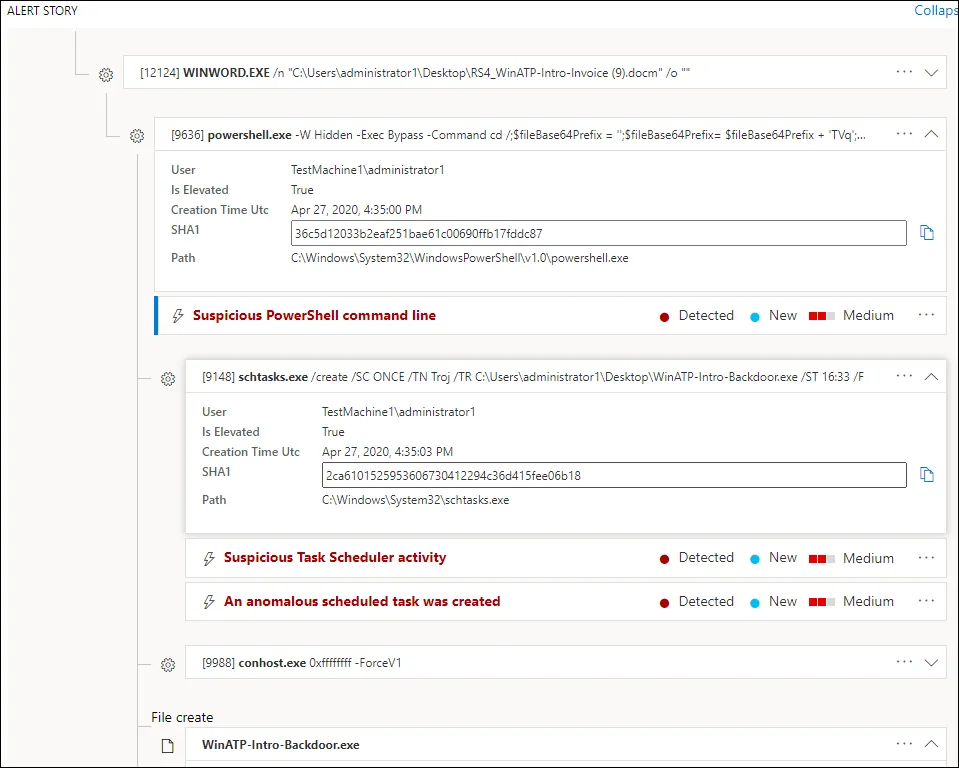
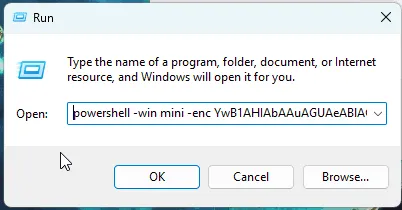
Let’s get a bit more specific, take a recent alert I investigated: EDR flagged ClickFix behavior, typically associated with obfuscated PowerShell executed via the ‘Run’’ dialog. Before reading this next part, what questions would you ask right away? The fundamentals for triaging this type of activity…Was PowerShell spawned by a suspicious process(PPID/PID relationship)? Did it spawn any child processes? Any modified registry keys? Do we see encoded commands or unusual parameters? Did the process make any outbound connections? Was a file dropped to disk? Each of these questions helps build confidence in your assessment. A “yes” might indicate an active intrusion, a “no” might suggest a heuristic misfire, or a user simply running a troubleshooting command or interacting with a fake “fix” guide online. Blah blah blah, either way, this step sets the stage for quantitative reasoning, where you begin measuring scope, impact, and scale.
The caveat? Used alone, it can oversimplify complex and layered incidents. Thinking about an event in a vacuum creates a lot of extra work when you sit and think about it. “When you don’t include any context surrounding the events, then you’re left with putting those pieces together yourself. This creates a lot of extra work and wastes valuable time, especially in SOCs where they are already spread so far thin,” said Juan. As Phil noted, “if you see something presented as an absolute or a binary choice, then use that as a red flag to do some critical thinking. Ask what would need to be also true for this to be true, and what would challenge the assertion”(https://www.philvenables.com/post/cybersecurity-and-the-curse-of-binary-thinking).
Quantitative:
This thinking turns the alerts into a pattern (or proves a lack thereof). Essentially, quantitative thinking is the ability to analyze data, recognize patterns, and use numerical evidence to make informed decisions. Once you have confirmed that something happened, the next questions we ask go like this: How many alerts fired in total? How many hosts, users, or sessions were affected? How many times did this browser extension ID, binary, hash, user agent string, or connection appear across the environment? How many files were created or transferred? How many outbound connections were made, to how many unique destinations, and over what time span? How many clicks on that phishing email?

Let’s pivot from isolated events to trends. Using the same ClickFix alert, you’d start by quantifying what you’re seeing: How many hosts triggered the same detection? How much obfuscation is occurring? How many domains are being contacted? Is this connection, file, or process present on any other endpoint? How many files were downloaded? How often has this detection fired in the last 24 hours, week, or month? Does this detection correlate with any other alerts? Has this detection appeared before for this user or host? Unless it’s the security automation team AGAIN lol. After quantifying the activity, I confirmed that this alert was triggered only on a single host. No file downloads were observed, no encoded commands, and no outbound connections were made. Additionally, there was no historical evidence of this detection firing previously for this user or endpoint. BUT this still doesn't answer the elephant in the room, “What is the root cause?”, ultimately, we still don’t know WHAT triggered this. This is where qualitative thinking comes in, making connections between behavior, intent, and environment.
Qualitative:
The last dimension, qualitative thinking, is about meaning, context, and interpretation. It goes beyond counting events and asks why they happened or how they fit into a broader narrative. Following the format of the previous dimensions, some questions we ask at this level are: What was the user doing just before the event, and what is their role within the org? Does the behavior align with legitimate activity, or is it anomalous? What context exists (browser history, RunMRU registry entries, user interaction) that explains or challenges the event’s legitimacy? What could the impact have been if this event had succeeded (persistence, lateral movement, exfiltration)? What assumptions are we making, and what would contradict them? Could this have been part of legitimate troubleshooting or administrative work? Was this technique observed elsewhere in the same timeframe? What sequence of actions led to this? The list can go on forever. The point is that, at this level, we’re gauging how far along the kill chain this activity may be, assessing intent, and gathering the necessary context to guide our eradication and containment efforts if it becomes necessary.
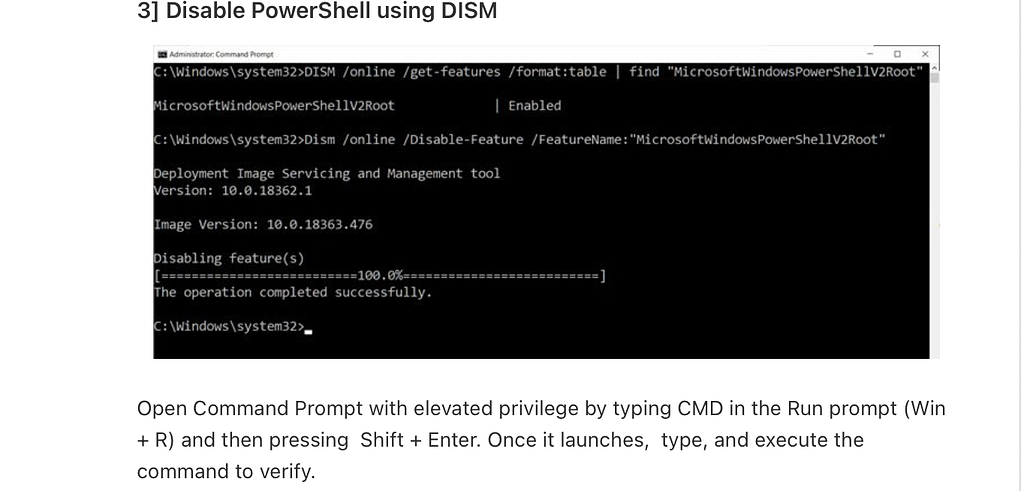
Returning to our ClickFix example, we confirmed that PowerShell executed and measured the scope (quantitative). Now, qualitative thinking asks: Why did this happen? In this case, we discovered that the browser history showed the user had visited a “disable PowerShell” article and then executed a DISM command. The execution chain appeared to exhibit potential attacker behavior, but qualitative insights (no file download, no obfuscated command, etc.) suggested benign user activity, a troubleshooting scenario flagged by the heuristic. Yippee, now we know the root cause is user troubleshooting, as indicated by the command below from the blog: https://www.thewindowsclub.com/disable-powershell-v2-windows.
Dism /online /Disable-Feature /FeatureName:"MicrosoftWindowsPowerShellV2Root"
Each dimension builds on the last. Binary thinking gives you clarity, quantitative thinking gives you scale, and qualitative thinking gives you meaning.
TL;DR
We reduce noise and build confidence through three dimensions: Binary (what happened), Quantitative (how much), and Qualitative (why). Thank you for reading.
Follow 0xEnleak and Juan_Snow1 on X.